Understanding assets
runZero treats assets as unique network entities from the perspective of the system running the Explorer. An asset may have multiple IP addresses, MAC addresses, and hostnames, and it may move around the network as those attributes change. runZero tries to follow each asset by correlating new scan data with the existing inventory across multiple attributes.
An asset always belongs to a single site. If multiple sites cover the same system, runZero treats it as a different asset in each site and correlates it only against assets within that site. With this separation, you can scan the same network from multiple perspectives and compare the results in a single view within the organization.
After each scan, runZero updates all assets within the corresponding site. A system that doesn’t match an existing asset becomes a new asset. If the scan does not find an asset in the site, runZero marks it offline. When an asset fails to correlate because its fingerprint changed substantially (for example, a new network adapter was installed and the firewall was enabled), runZero marks the previous asset offline and creates a new asset to track the new configuration. This can leave some duplicates within a site, but they are usually marked as offline, and you can safely ignore them or remove them from the inventory by hand.
Asset fields
You can search and filter on the fields below with the asset inventory keywords.
Primary addresses
runZero reports at least one, and often several, primary IP addresses for an asset. These addresses can span multiple network interfaces, but an address only appears as a primary address if runZero has scanned it, which means it falls within the scan scope of one or more runZero scans.
Secondary addresses
runZero may report one or more secondary addresses, based on network response probes. These are IP addresses detected on the asset that were outside the scan scope. You need secondary address detection to identify systems bridging networks that should be isolated.
Hostnames
runZero may report one or more hostnames. Names can come from the initial DNS lookup (when the scan scope includes hostnames), from DNS PTR lookups during the scan, and from names advertised in network probe responses.
Operating system (OS)
runZero attempts to fingerprint the operating system running on each asset and, failing that, to guess it. With limited information, this field may be empty.
Type
runZero attempts to determine the general device type by analyzing fingerprints and running services.
Category
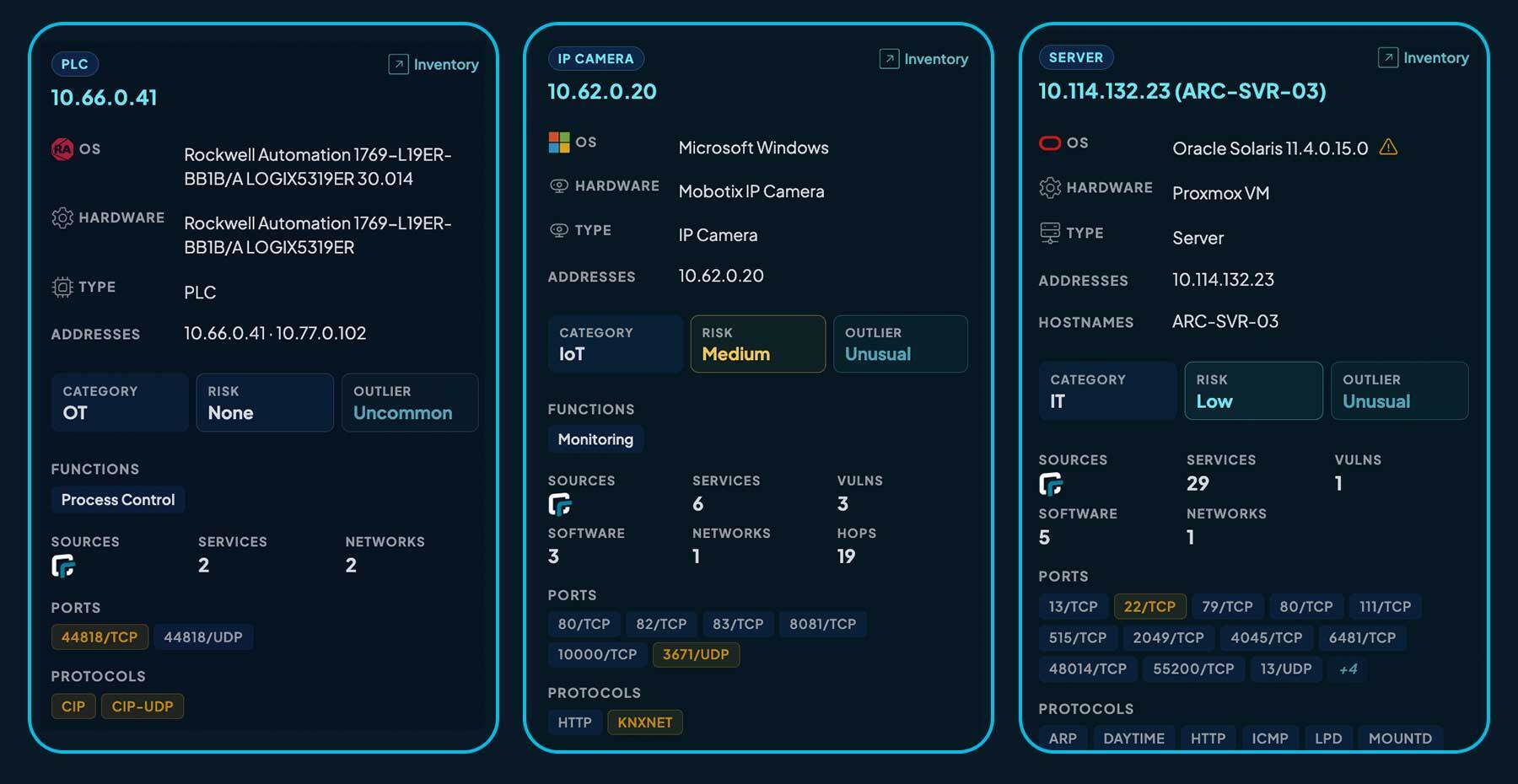
runZero classifies every asset into a high-level asset category so you can separate traditional computing infrastructure from operational technology and connected devices at a glance. The category comes from the device type, vendor, and service protocols (for example, an asset speaking Modbus, CIP, or S7Comm is placed in OT automatically).
| Value | Meaning |
|---|---|
IT |
Traditional information-technology assets: servers, workstations, laptops, network gear, storage, hypervisors. |
OT |
Operational-technology assets: PLCs, RTUs, IEDs, DCS, SCADA, HMIs, drives, protocol gateways, industrial robots. |
IoT |
Connected devices that are neither IT nor OT: IP cameras, building-automation sensors, printers, smart-TVs, medical devices, point-of-sale, access control. |
Query with category:OT, category:IT, or category:IoT. To override the category, set the category asset attribute to one of these three values.
Functions
Beyond a category, OT and OT-adjacent assets carry one or more asset functions describing what the device does. Functions are multi-valued: a single device can carry several at once (for example, a substation IED is both Process Control and Monitoring).
| Function | Typical assets |
|---|---|
Process Control |
PLCs, RTUs, IEDs, DCS, SCADA controllers, supervisory-control software. |
Safety |
Safety controllers, safety PLCs, Safety Instrumented Systems (SIS). |
Human Interface |
HMIs, operator panels, touchscreens, control-room displays. |
Engineering |
Engineering workstations and laptops used to program, configure, or maintain OT devices. |
Monitoring |
Sensors, meters, condition-monitoring units, tank monitors, environmental sensors used for observation only. |
Environmental |
Building-automation, HVAC, lighting, refrigeration, room and climate controllers. |
Communications |
Field-bus gateways, protocol translators, serial-to-IP adapters, modems used inside OT segments. |
Networking |
Switches, routers, firewalls, and data diodes that segment or interconnect OT zones. |
Remote Access |
Jump servers, VPN concentrators, and remote-access servers used to reach OT environments. |
Data Management |
Historians, data loggers, and other systems whose primary role is storing operational data. |
Power Management |
UPS units, PDUs, power meters, transfer switches, generators. |
Physical Security |
Access-control panels, door controllers, alarm panels, surveillance NVRs. |
Cyber Security |
OT-resident IDS/IPS, security gateways, and other dedicated cyber-security appliances. |
Management |
Management appliances and consoles used to administer OT devices and networks. |
Query with function:"Process Control", function:Safety, has:functions, and so on. To set function values by hand, edit the asset’s functions attribute.
Hardware
runZero attempts to determine the physical (or virtual) hardware when enough information is present.
MAC addresses
runZero may be able to enumerate one or more MAC addresses from the asset. It pulls them from ARP when available, and also from several network services that can return MAC address information across routed segments.
Services
By default, runZero tries to detect approximately 100 TCP services plus several useful UDP services, on top of ARP and ICMP. The services field lists the most recently recorded services for the asset.
Round trip time (RTT)
runZero records how long certain probes take, which gives a rough sense of the latency between the Explorer and the asset.
Detected by
runZero records which probe identified an asset. For assets on remote subnets with firewalls in place, this field shows which service produced a response.
Alive status
runZero tracks whether an asset was found during the most recent scan that had its site in scope. An asset that was not found is marked as offline until a later scan detects it again.
First seen
runZero records the timestamp when it first identified an asset.
Last seen
runZero records the most recent timestamp when an asset responded to a probe during a scan.
Explorer
runZero tracks the most recent Explorer to detect an asset through active scanning or passive discovery. Third-party connections that run through an Explorer do not typically update this field, because the third party detected the asset, not the Explorer.
Outlier score
runZero computes an outlier score from 0 to 5 (inclusive) for every asset in your inventory. The score is a heuristic that aims to show how unusual the asset is compared to all of the others in the inventory.
To compute it, runZero examines the main properties of the asset and its services, works out which values are unusual (infrequent) across the organization, and counts how many unusual properties each asset has. The more unusual properties an asset has, the higher its outlier score.