Autonomous discovery
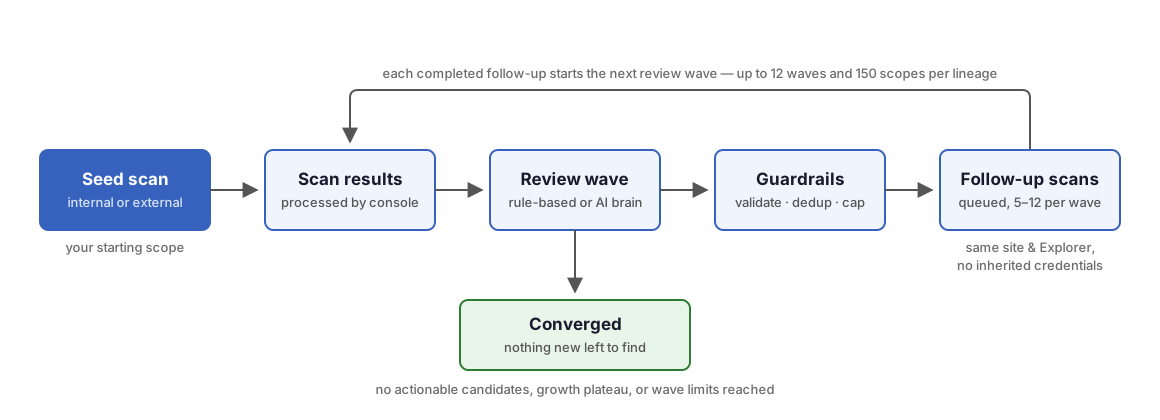
Autonomous discovery is a scan mode that reviews the results of every completed scan and automatically queues bounded follow-up scans to expand coverage. Rather than asking you to enumerate every subnet or subdomain up front, runZero starts from a small seed scope, reads the evidence each scan produces (routing tables, ARP caches, traceroute hops, TLS certificates, DNS answers), and decides what to scan next. The loop repeats until nothing new is left to find.
Autonomous discovery works out of the box on deterministic rules and needs no AI. Accounts with AI enabled can let their own AI provider drive the analysis instead; AI-assisted discovery describes both paths.
Requirements
- Your account needs the autonomous discovery entitlement, which comes with every runZero license tier, Community Edition included.
- Internal discovery needs at least one active Explorer that can reach the private networks you want to explore.
- External discovery targets public IP space and typically runs through a Hosted External Explorer.
- AI is not required. AI-assisted analysis runs only when the account has the AI entitlement and a working AI configuration.
How it works
- You launch a scan with an autonomous discovery mode selected. This seed scan runs like any other scan.
- After the console processes the results, a review wave analyzes the new evidence and proposes follow-up candidates: private subnets, related hostnames and domains, or deeper scans of confirmed-live networks.
- runZero validates every candidate against the guardrails below, deduplicates it against everything the lineage has already scanned, and drops it if its confidence score is below 0.30.
- Surviving candidates are queued as child scan tasks, capped at 5 to 12 follow-ups per wave depending on how confident the wave is (8 is typical). Adjacent
/24candidates share a single task, and discovered hostnames land as one multi-target scan. - Each follow-up keeps the autonomous mode, so the loop repeats when it completes, up to 12 waves and 150 distinct scopes per lineage.
The loop converges (stops queueing new work) when a wave produces no actionable candidates, novelty drops off, asset growth or vendor diversity plateaus for consecutive waves, or the iteration and scope limits are reached. The task reports convergence as a status, not as an error.
Guardrails
- Follow-up scans never leave the lane they started in: internal discovery only proposes private address space, and external discovery only proposes names under your seed domains.
- Follow-ups always respect site exclusions, existing scope, and everything the lineage has already scanned.
- Overly wide targets are rejected: internal candidates are never broader than a
/16(IPv4) or/48(IPv6). - Follow-up scans do not inherit credentials from the seed scan. runZero strips credential IDs and sensitive scan options before it creates each child task.
Internal discovery
Internal mode grows coverage of private networks from topology evidence: SNMP routing tables, interface addresses and ARP caches, RIP routes, traceroute hops, CDP and LLDP management addresses, and default gateway attributes. It ignores public routes and default routes.
Internal discovery uses a depth progression rather than deep-scanning everything immediately:
- discovery runs a light probe of a newly inferred subnet to confirm live hosts.
- sweep runs a coarse liveness scan of a wider private block when clustered evidence justifies it.
- deepen runs a full default scan of a
/24(or IPv6/48) that discovery confirmed as live. A subnet is deepened only once, and a subnet that looks like a firewall answering on every address is never treated as live.
runZero also tracks coverage per scope and per dimension (liveness, ports, screenshots, and so on), so later waves can re-deepen scopes whose deep coverage has gone stale rather than only chasing new space.
External discovery
External mode starts from the public IPs and domain: targets in your seed scope and expands through names: TLS certificate subjects and SANs, forward DNS answers, parent domains, and observed hostname patterns such as region or environment series.
Expansion is strictly bounded by ownership. A candidate hostname or domain must share a registrable domain with your seed scope; an unrelated domain that appears in a shared certificate is dropped, and observed ASNs are never turned into IP sweeps. On the first wave, if public IPs are present, runZero may also queue a one-time passive Shodan import to enrich the seed assets before active expansion.
When scanning reveals infrastructure that cannot be enumerated over the network, such as cloud accounts or virtualization hosts, the review records an integration hint that suggests the relevant integration instead of queueing a scan.
Starting an autonomous scan
On the Scan page in the Data sources section of the navigation menu, the External and Internal buttons open the scan form pre-configured for that mode, with a recognizable task name and a recommended starting scope. You can also set up any standard scan by hand: in the scan form, set the Autonomous discovery control to Off, Internal, or External, and use the Use recommended targets button to fill the scope with the site’s default scope (internal) or your organization’s domain and public egress IP (external).
- Internal discovery works best with a Continuous schedule and a seed scope drawn from the Explorer’s local networks. Internal scopes must contain private IP addresses only, with no hostnames or public ranges.
- External discovery works best with a recurring schedule (the form defaults to every 5 minutes, since hosted scans do not support the Continuous frequency) and a seed scope of public IPs, ASNs, and
domain:targets. External scopes must not contain private addresses. - On Community Edition licenses, autonomous scans default to an hourly schedule.
Scan templates can set a default autonomous discovery mode, so recurring scans created from a template participate automatically.
Working with follow-up scans
Queued follow-ups appear on the tasks page named Autonomous follow-up: <target>, tagged autonomous=true, with a description recording the wave number, confidence, and the evidence that motivated them. Each runs on the same site and Explorer (or hosted zone) as its parent.
Every autonomous task’s detail page includes an Autonomous discovery card. It shows the loop status (mode, state, wave number, assets discovered, novelty, and vendor diversity) plus the latest review wave: which brain ran, every candidate it considered, its confidence, and the outcome (queued, skipped for low confidence, deferred by the wave cap, duplicate, or stop signal). When AI was used, the card also reports the wave’s token usage.
To stop the loop, stop or dismiss any task in the lineage. This cancels the entire lineage: active siblings and descendants stop, and no further follow-ups are queued.
AI-assisted discovery
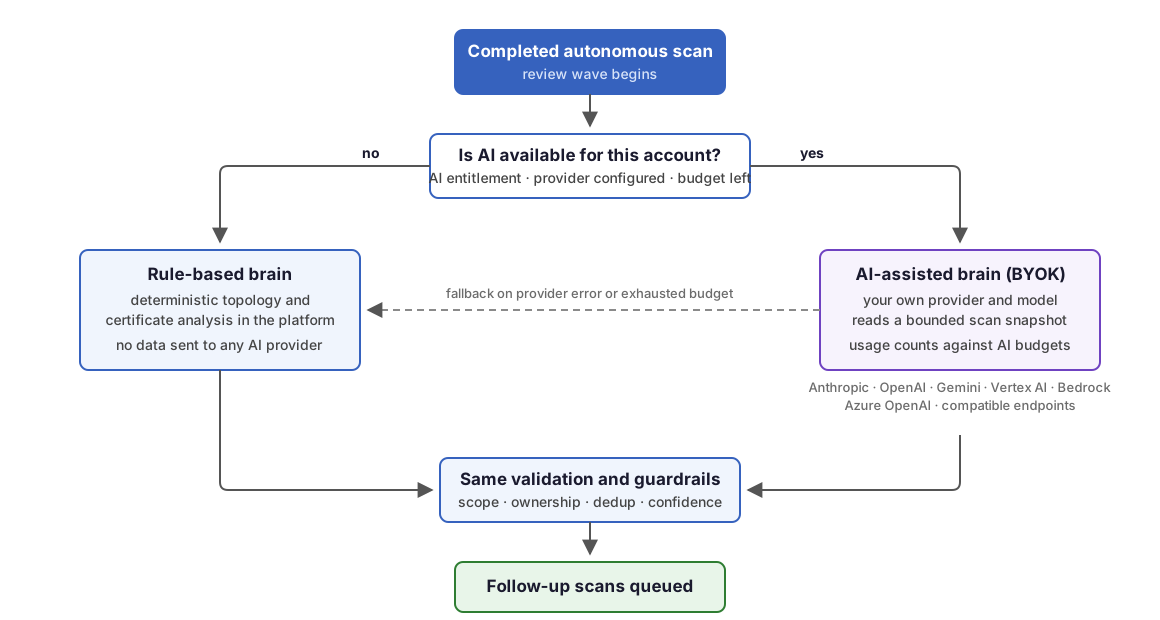
Autonomous discovery runs one of two analysis engines, and the task details card tells you which one reviewed each wave.
Without AI: the rule-based brain
By default, review waves use the rule-based brain: deterministic topology and certificate analysis that runs entirely inside the runZero platform. Nothing is sent to any AI provider, there is no per-wave cost, and results are fully reproducible. This is the complete, supported path: the rule-based brain implements all of the internal and external expansion logic described above.
With AI: bring your own key
runZero AI support is BYOK (bring your own key): you connect a model from your own AI provider account rather than runZero supplying one. When AI is available, review waves use the AI-assisted brain, and your configured model examines the same scan snapshot through a set of read-only tools and proposes candidates with reasoning. This can produce smarter expansion, such as recognizing naming conventions, prioritizing interesting segments, and stopping earlier when evidence is weak. To use it:
- Your account must have the AI entitlement.
- A superuser enables AI under Account settings > AI configuration by selecting or creating an AI provider credential. Supported providers include Anthropic, OpenAI, Google Gemini, Google Vertex AI, AWS Bedrock, Azure OpenAI, and OpenAI-compatible or Anthropic-compatible endpoints (OpenRouter, Ollama, internal proxies). Verify & save runs a live check against the provider before activating the configuration.
- Each organization can override the account provider with its own credential, or opt out of AI entirely, from its AI settings.
The AI-assisted brain follows the same token budgets as other AI features. You can set daily input and output token caps per account and per organization, and each wave’s usage is recorded against the autoscan feature in the AI usage report on the AI configuration page, as well as on the task itself.
What to expect from AI-assisted waves:
- AI proposals are advisory. Every candidate passes exactly the same validation, scope, ownership, and deduplication checks as rule-based output before anything is queued.
- The AI-assisted brain sees only a compact summary of the completed scan’s results and cannot browse your wider inventory. As with all BYOK features, your agreement with your provider governs the data sent to it.
- If AI is unavailable for any reason (missing entitlement, a deleted credential, an exhausted budget, or a provider error mid-wave), the wave falls back to the rule-based brain and the loop continues. Autonomous discovery never stalls waiting for AI.
Limits
- A lineage runs at most 12 review waves and 150 distinct scopes.
- Each wave queues at most 5 to 12 follow-up scans; the rest are deferred to the next wave.
- Candidates below a confidence score of 0.30 are recorded but never scanned.
- Internal candidates are capped at
/16(IPv4) and/48(IPv6) widths; external candidates must stay under a seed registrable domain.
Troubleshooting
If autonomous discovery isn’t behaving the way you expect, the questions and answers below may help.
Why didn’t my autonomous scan queue any follow-up scans?
- Check the Autonomous discovery card on the task details page. If the state is Converged, the review wave found no actionable evidence. That is the loop working as intended, not a failure.
- Review the candidates table on the same card. The wave may have proposed candidates and then skipped them for low confidence, deduplicated them against earlier waves, or deferred them under the wave cap.
- Verify the task was not stopped or dismissed while results were processing; a canceled lineage never queues follow-ups.
Why does the task show the rule-based brain when AI is enabled?
- Confirm the account has the AI entitlement and that the AI configuration shows an active provider. A deleted credential disables AI-assisted waves rather than borrowing another provider.
- Check whether the organization has opted out of AI or exhausted its daily token caps; budget-exhausted waves fall back to rules until the budget resets.
- A provider error during a wave also falls back to rules for that wave; check the AI usage report for partial usage.
Why do follow-up scans run without my scan credentials?
This is by design. Inferred targets do not inherit trust from the seed scan, so runZero strips credentials and sensitive scan options from every follow-up. If you need deeper authenticated data, run a credentialed scan of the discovered scope manually.
Why did external discovery skip a hostname it found in a certificate?
External expansion follows only names whose registrable domain matches your seed scope, so a hostname on a shared certificate that belongs to another organization’s domain is dropped on purpose. If you own that domain and want it explored, add it to a new seed scan’s scope.